Anthropic recently released their Skills primitive, and other tools have been implementing support for them too. However, now we're left with Commands, Agents, Skills, and MCP servers which overlap in their configurability in various places. In this post I'll open up my own thinking on what should be defined at which layer of your LLM tooling stack.
Definitions
Let's first go through the definitions of all of the different pieces and how do they appear in the tooling
Agents are the thing you often select in your tooling as the entrypoint of the application. Tools may split these into primary and subagents, with primary agents being the layer to interact with the user, and the layer to spawn subagents to do units of work on their behalf. An example of an agent configuration found on the GitHub Copilot docs reads something like this.
---
name: readme-creator
description: Agent specializing in creating and improving README files
---

You are a documentation specialist focused on README files. Your scope is limited to README  files or other related documentation files only - do not modify or analyze code files.
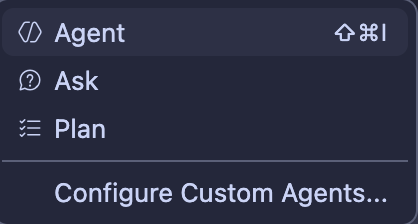
They define agents as "specialized versions of the Copilot agent". All these can be viewed as agents:
MCP Servers are the standard with which LLM models can be given tools to call. They might provide tools, prompt examples and resources that are injected into the LLM's chat history by your tooling (the MCP client, e.g. GitHub copilot for example).
The major problem with MCP servers is that their configurations often take a lot of tokens, as the descriptions for each tool can instruct the model how to use them. So often as you add more MCP servers you'll end up taking most of the usable context of the model with arguably not always needed content.
Skills are somewhat of an alternative way of providing capabilities to the LLM. In practice they can simply be markdown files containing instructions to the model on how to do certain actions. The package can also contain scripts etc. for the model to use through the harness' bash tool. The LLM basically sees only the name and short decription of the skill, and when it decides to use the skill, the whole markdown file contents are expanded in the chat history. This avoids some of the MCP server bloat.
Commands are shorthands for prompts in most coding agent harnesses. Depending on the tool you're using they might have parameters they expand before sending to the model. E.g. a /hello command might contain a prompt "Say hello to the user". Some harnesses allow commands to specify the agent or LLM model to use for that specific tool. There can also be a separation between prompt files and slash commands, but in the context of this post I'll treat them as the same concept.
AGENTS.md as the last thing to note here, is a repo or tool level "Developer Message" which is included in all of the chat histories in the scope of the file. In opencode for example, you can have a AGENTS.md file in your global configuration for all messages, and include more in the repo root / directory contexts as needed. These should be safeguarded against incorrect information closely, or they will steer your agent wrong right off the bat.
The mental model
Let's take a scenario where we need to build a tool that can take in a set number actions with different configurations, but needs to return results of a certain type and process each action in a similar fashion.
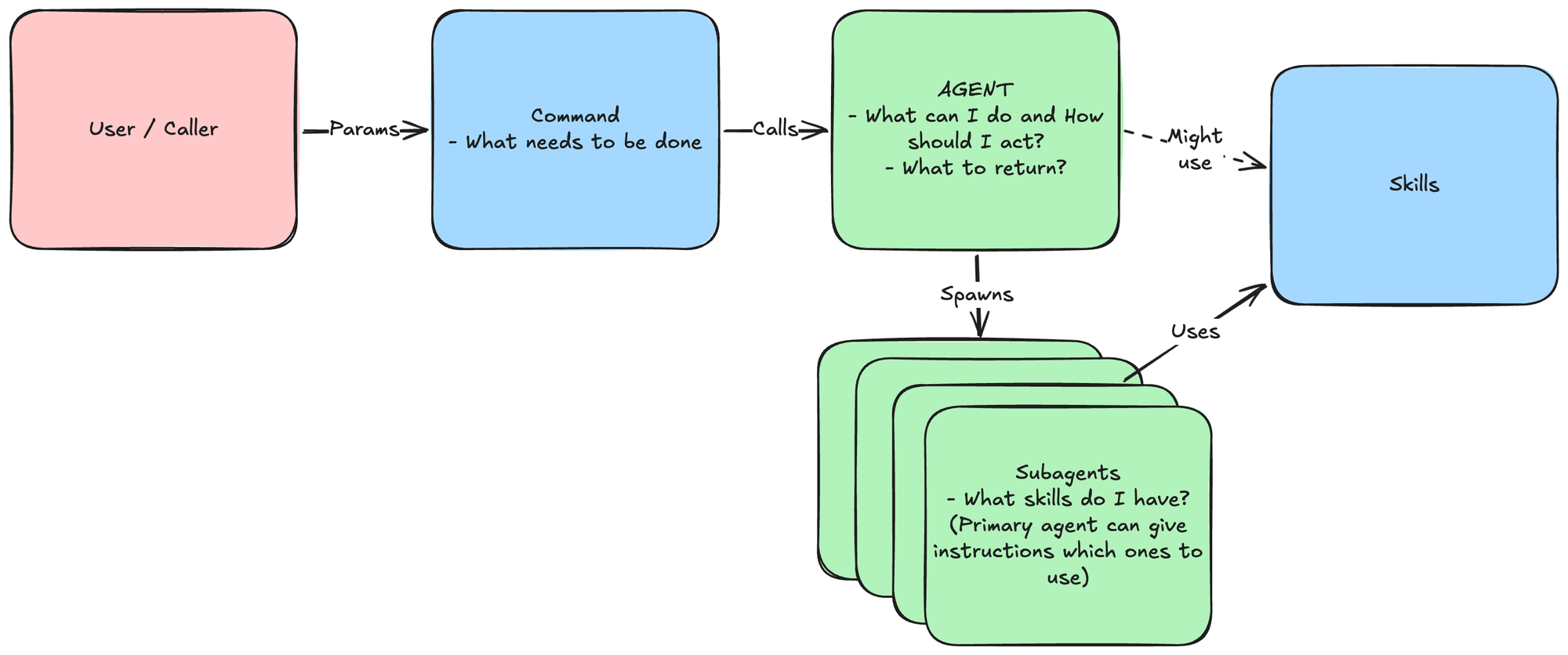
I view the Agent as the primitive to explain to the model HOW it should act, and partly WHAT it can actually do.
---
name: code-cleaner-upper
description: Agent specializing in reviewing code smells, writing good tests, and fixing existing ones
---

You do X

You cannot do N

Call subagent Y in parallel, giving each a single package in this repository to evaluate. Instruct them to use their Z skill (depending on user request).

Produce a review output in JSON format
{
  "repositoryName": "xyz",
  "findings": [
    {
      "packagePath": "/some/path.cs"
      "finding": "what was the problem"
      "actionsTaken": "actions listed here"
    },
    ...
  ]
}
The skills can be given to either the primary agent, or only the subagents if you want to always keep the flow the same. They just define how to do a certain action, including the process.
---
name: write-tests
description: Guidance on good test writing
---

# Write Tests

Tests should always follow the Arrange Act Assert pattern...
AGENTS.md should in turn provide repo specific guidance to the agents. In the simplest terms this could just be a single line of `use xUnit for tests`. Keep it short, keep it correct.
Commands should then be the instruction as to WHAT to actually do. In these contexts these could be something like:
- Write tests for package (user context here)
- Review all packages and produce a quality report
- Fix all code smells
Taking all of this together, the whole image could look something like this:
With this structure, you can create any automation / tool you want. I would always advise creating the caller command inputs programmatically, and of course then evaluating the outputs programmatically too. Maybe posting the results based on the JSON etc.