In this post I'll describe some of the fundamental building blocks of creating an AI Dev platform for organizations in Azure. Implementation details are left to the reader to decide, but I'm somewhat opinionated in this.
The goals of a platform in this case are:
- Unifying tooling for everyone
- Providing easy onboarding, easy automatic distribution of new features
- Central authentication, allowing the org a single place to integrate tools to
- General use MCP servers and services, like session sharing, code lookups, sandboxed runners
- Tracking of usage, troubleshooting
All this while still allowing for customization for user's own needs.
Platform Core
The core we need to figure out first is the entrypoint to the platform, e.g. routing, apis, model hosting and observability.
The canonical stack in Azure to implement this is pretty much always some kind of a service providing an optional Web Application Firewall, custom domain support, and routing capabilities combined with an API management service. In my implementations I reach for Azure Front Door (FD) to handle routing needs, whereas Azure API Management (APIM) handles the rest.
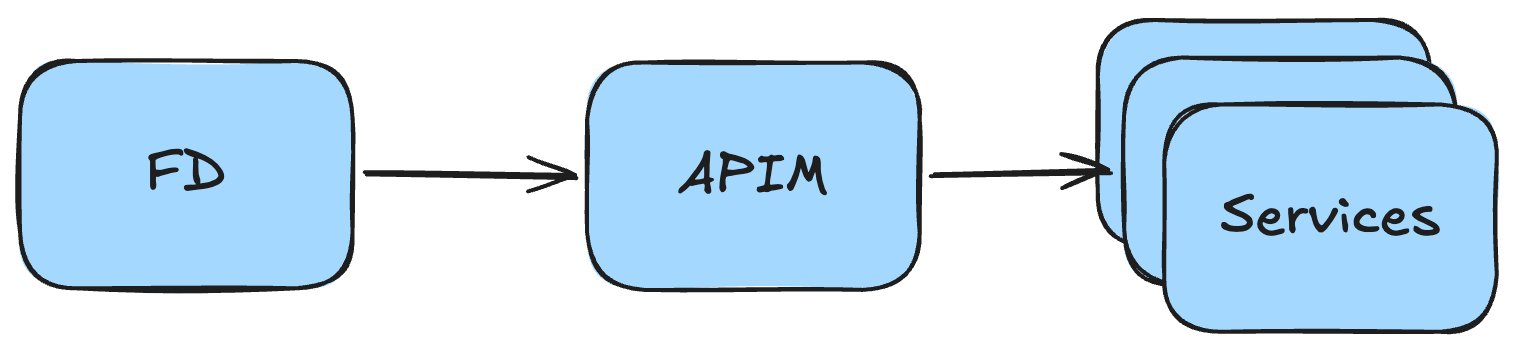
The Front Door routing is often very minimal, and mainly acts as a passthrough in this case, but you could of course host some services past the API. Some options being documentation libraries and other frontends.
Auth
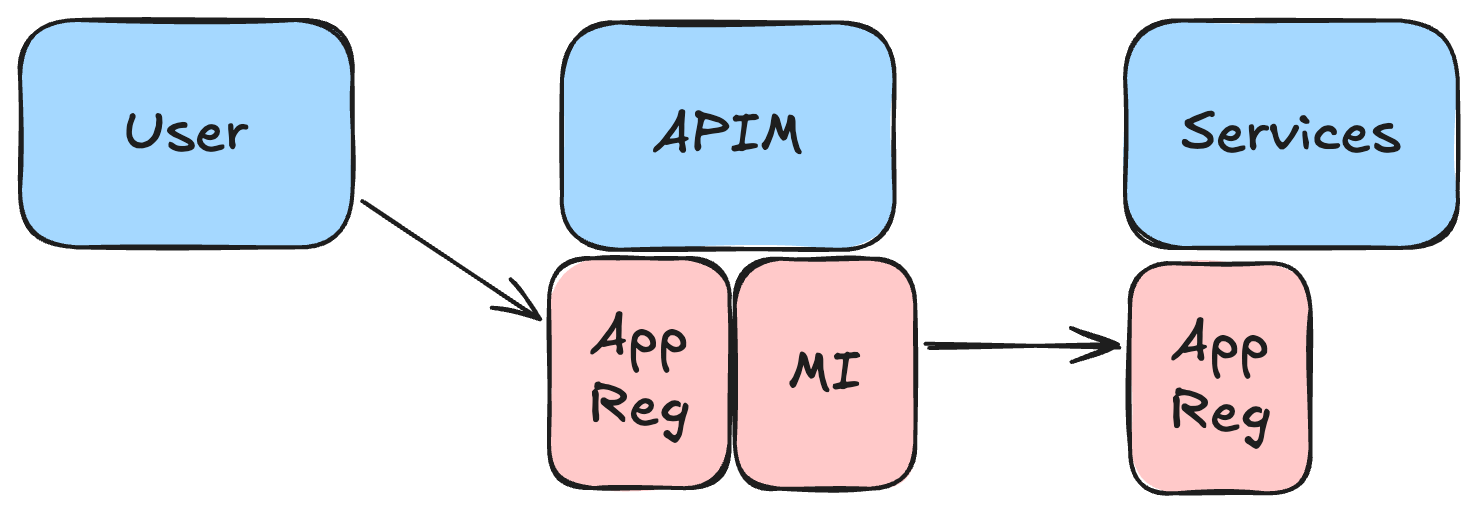
API Management acts as the central authentication layer in the platform. The policies check user tokens and use the managed identity to make the actual calls to the service. This way we can use only a single app registration for the platform in Entra ID and manage all necessary user roles there. User tokens can be forward to backend services if needed.
I often use them as the location to set common platform owned headers and enrich OpenTelemetry baggage too. Maybe you want to track how many user's you have, and how many tokens are they using etc.
Models
Azure really has a single reasonable way of hosting LLM models, and that's Microsoft Foundry. You can get both OpenAI and Anthropic models hosted through there, as well as a large set of models from other providers too.
Foundry ties well together with APIM, with some syntactic sugar being offered by the (still-in-preview) AI Gateway feature. The preview services are still somewhat confusing, and I've also added a specific foundry endpoint to my solutions to enable token tracing at the APIM policy level.
The main idea here is that if any of our internal services, or any of the users need access to LLM models, they can get them from a single shared foundry instance. How you split the capacity in the deployments is up to you. APIM can also be used to do this load balancing, so you could forward as much traffic to your PTU based deployments as possible.
Observability
As hinted before, I use OTel for everything in my implementations. It makes it very easy to standardize telemetry for all the services in the platform. All of your services should have some kind of a shared OTel library to easily implement new platform-wide headers / span properties.
Logs in Azure often go to a Log Analytics Workspace, which is what I also recommend. This should be owned by the platform core. You could also host a central OTel collector to do sampling before sending the data to the LAW so you can save a pretty penny not logging all the traces.
You can also create some quite nifty dashboards on your telemetry with Azure Workbooks or tools like Azure Managed Grafana. You'll likely need to craft these yourself, but models are decent at creating the required KQL queries too.
User Tooling
Okay, so we have something to call from our tooling, but what exactly is the tooling? In my case, I lean heavily on Opencode as I've used it as my main coding assistant for a long time now. You can use whatever you want, but crucially Opencode provides the following features we need:
- User writable custom plugins to handle our authentication matters hidden from users, who may not be very technical
- Client-Server model, so we can decide where the server runs, and what the client looks like (e.g. use the ones provided, or write our own)
- Open-source. Easy for us and LLM models to write code against.
- Support for multiple model providers, simultaneously
So, the core of our tooling focuses on writing custom agents, commands, skills and MCP configuration etc. while shipping this package automatically to our users. I'm not going to go into the implementation details here, but you'd at least want to handle all authentication concerns with plugins and think of your own requirements for headers, workflows etc. within this package.
A thing to think about also here is whether it's simpler and cheaper to purchase subscriptions to LLM model providers or pay for API billing through foundry, but Opencode allows for both.
Design your user tooling package so that if the users decide to, they can still install their own skills, providers etc.
I'll leave the details of this auto update logic up to you. I'm sure your end user device management people will have some opinions and requirements for this.
Backend Services
Now that we have the tooling set up, we should talk about the backend services to provide. This is of course very dependent on your use case, but here are some ideas.
- RAG search database on your context's data. Maybe through tools like Foundry IQ
- Remote codebase searches for better LLM context. In the spirit of BetterContext (not endorsing this service, feel free to write your own)
- Sharing service for opencode sessions. Keep it internal, you'll figure it out.
- Background agents functionality, like Ramp's Inspect
- Various MCP servers, depending on your needs. You'll likely need to write some wrappers to support your auth requirements, OBO token flows etc.
- Possibly a sandbox environment for CodeMode calls.
Make sure your backend services follow a similar pattern of integrating with the platform, mainly focusing on the authentication and authorization part. When you build up these building blocks, you'll be able to easily add more services over time, and depending on your auto update process, you'll likely be able to push out functionality to your users seamlessly.