I've been building out AI platforms on Azure, and as part of that ended up spending a fair bit of time with both the newer AI Gateway story in API Management and the imported Microsoft Foundry endpoint flow. On paper the split is fairly simple. You can either enable AI Gateway directly in Foundry, or you can import a Microsoft Foundry API into APIM and manage it there.
In practice, I found myself needing both. This post will go through the reasons why, where I think the current split makes sense, and which parts of the setup still feel a bit awkward to me.
Platform concerns
Once a few teams start using shared LLM capacity, governance stops being a boring afterthought.
The requirement is usually not "block everything until architecture is perfect". It is more like this:
- usage should be fair
- usage should be observable
- usage should not let one team accidentally starve everyone else
- prepaid capacity should be used well
- overflow should still have somewhere to go
That last one matters more than it first appears. If you have bought model capacity up front, you obviously want to get value out of it. At the same time, real workloads are rarely flat. If traffic spikes, you may still want to route excess usage somewhere else instead of just failing calls.
As a small sidenote though, at least here in Finland and at the scale most companies around me are operating, buying large chunks of prepaid capacity from Microsoft is still not that common. The cost is usually just too high compared to what they are actually getting out of the deal, so pay as you go is still the more realistic default for many teams. I still think the routing and governance model matters, but the "protect the expensive prepaid capacity" story is often more of a future-looking platform concern than today's norm.
APIM is not the whole answer to that, but to me it is still the most practical place to put the control logic. Microsoft calls out token governance, load balancing, semantic caching, content safety, and observability as part of the AI Gateway story for APIM and that's roughly the same shopping list I tend to have anyway when building shared AI access layers.
Implementing both paths
If you want the quick path, you can enable AI Gateway directly in Foundry and manage model limits there. If you want more control, you can import a Microsoft Foundry API into APIM and use the broader APIM policy surface.
The two routes still don't line up feature for feature. In my setup, the Foundry-managed AI Gateway route didn't give me everything I wanted from the APIM side. The biggest gap was token visibility. I wanted APIM-side token metrics with my own dimensions and dashboarding model, and I also wanted an explicit OpenAI-compatible path for certain clients.
So I ended up exposing two API surfaces on the same APIM hostname:
- one more generic AI Gateway style path for Foundry traffic
- one imported Foundry models path for the OpenAI-compatible endpoint
It's not very elegant, rather it's more the current shape of the platform when you care about the operational details.
My guess is that this split shrinks over time and the capabilities converge. Right now though, I still had to think about which path gave me which capability, and before I actually dove into the documentations I was thinking just the AI Gateway would bring me everything.
The practical shape was roughly this:
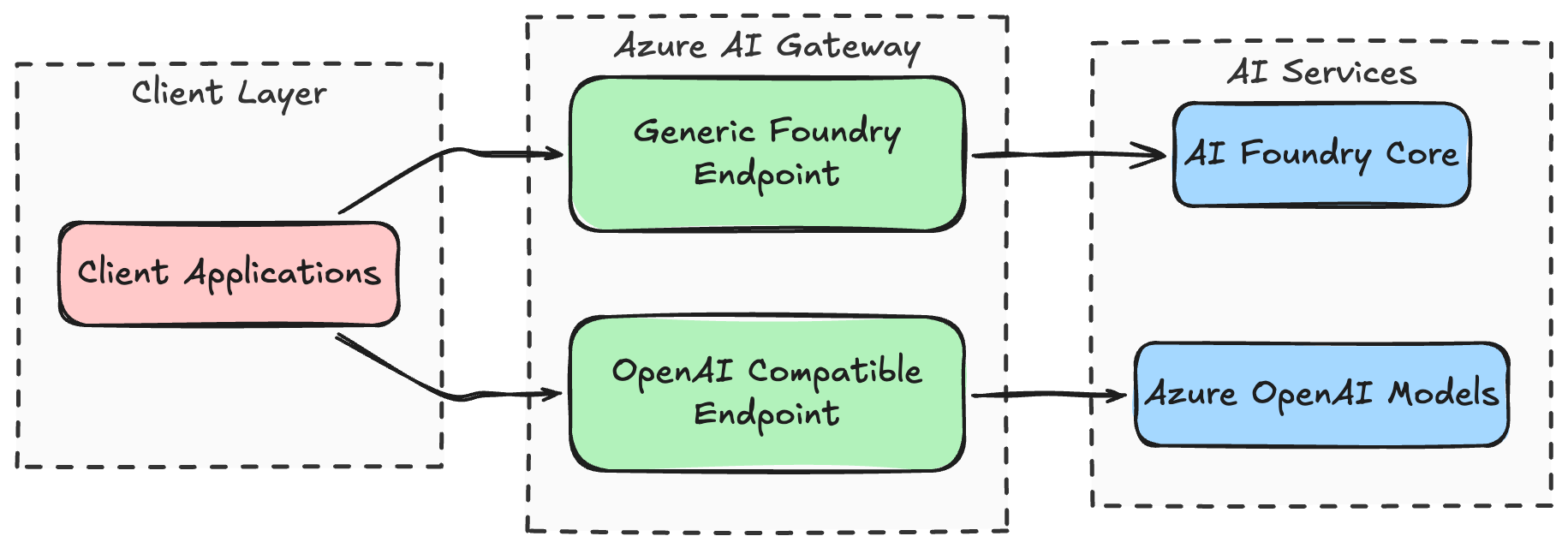
That probably looks slightly silly at first glance, but it let me keep one hostname and one platform entrypoint while still exposing two slightly different integration styles.
- I wanted the more direct AI Gateway style shape that maps well to the Foundry story.
- I also wanted the imported endpoint shape where APIM policy behavior and metrics felt more explicit for my use case.
If you are only doing one of those, this probably sounds more complex than necessary. That is fair. If your needs are simple, the Foundry-managed path is likely enough. But if you are building a shared platform and care about compatibility, control, and reporting, it gets easier to justify.
## When I would use AI Gateway vs imported Foundry APIs
If I wanted to simplify the decision for myself today, I would phrase it like this.
Use the Foundry-managed AI Gateway when...
- project-level token limits are enough- you want the Foundry control-plane experience
- you want to get going quickly and can live with preview-era boundaries
That path is attractive precisely because it is less APIM-shaped. You stay in Foundry, wire the gateway up, enable projects, and move on. For some teams that is exactly the correct level of abstraction. The Foundry AI Gateway docs and the model token limit docs describe that path fairly well.
Use imported Foundry APIs in APIM when...
- you need policy-level control
- you want your own telemetry dimensions- you care about detailed monitoring and reporting
- you need the endpoint shape to be predictable for existing clients- you already think of APIM as the platform entrypoint anyway
You can use managed identity auth to the backend, attach token limiting, token metric emission, AI gateway logging, and if you want to, semantic caching too. Again, I don't think this split is permanent. I just think it still matters today.
Sidebar: why I keep using user-assigned managed identities everywhere
This is not really a special AI Gateway decision for me. It's just something I do for basically all of my applications. Whenever possible, I prefer to separate identity and permissions from the infrastructure choice itself.
That means if I deploy APIM, a Function App, a Container App, or something else, I would usually rather attach a user-assigned managed identity than let the resource identity be completely implicit. Not because the default identity model is wrong, but because the user-assigned approach gives me free flexibility later. If I redeploy the infra, swap one hosting choice for another, split something up, or move a permission boundary, I can keep the identity and its RBAC assignments more stable. In practice that makes the permission story easier to reason about over time.
So in this case I did the same thing with APIM. Instead of treating the default identity behavior as part of the gateway feature itself, I attached a dedicated user-assigned identity and used that identity when calling the Foundry backend.
That looks roughly like this in a simplified form:
resource gatewayIdentity 'Microsoft.ManagedIdentity/userAssignedIdentities@2025-01-31-preview' = {
  name: 'id-apim-shared-ai'
  location: location
}

resource apiManagement 'Microsoft.ApiManagement/service@2025-03-01-preview' = {
  name: 'apim-shared-ai'
  location: location
  identity: {
    type: 'UserAssigned'
    userAssignedIdentities: {
      '${gatewayIdentity.id}': {}
    }
  }
  properties: {
    publisherName: 'Shared AI Gateway'
    publisherEmail: 'platform@example.net'
  }
}
And the APIM backend auth shape is similarly straightforward:
<inbound>
  <set-backend-service backend-id="foundry-backend" />
  <authentication-managed-identity
      resource="https://ai.azure.com/"
      client-id="11111111-2222-3333-4444-555555555555" />
  <base />
</inbound>
For the OpenAI-compatible style endpoints, the target resource would typically be https://cognitiveservices.azure.com/ instead. The relevant docs here are auth for AI APIs in APIM and managed identity configuration for APIM backends.
RBAC-wise, the important part was simply granting that identity the backend access it needed. For my case that meant the Cognitive Services User role on the Foundry account and project too(?). Can't actually remember.
Observability payoff with APIM
I wanted to get some telemetry on usage, which APIM thankfully provided:
- one place to enrich requests with stable platform metadata- one place to emit token metrics
- one place to send gateway and LLM logs onward
- dashboards that are useful to platform owners, not just to whoever happens to be staring at a single model deployment
I had the gateway add a few platform-specific headers and baggage values, and I also hashed the incoming user object id before using it as a metrics dimension. That gave me a reasonably privacy-safe way to answer questions like "who is using the platform", "which tools are hot", and "which traffic is burning the most tokens" without spraying raw identifiers around.
The token metrics part was powered by llm-emit-token-metric. A simplified policy example looks like this:
<llm-emit-token-metric namespace="shared-ai">
<dimension name="API ID" />
<dimension name="Operation ID" />
<dimension name="user_hash" value="@(context.Request.Headers.GetValueOrDefault("x-user-id-hash", ""))" />
<dimension name="deployment" value="@((string)context.Request.MatchedParameters["deployment-id"])" />
</llm-emit-token-metric>The flow of telemetry looks pretty much like this:
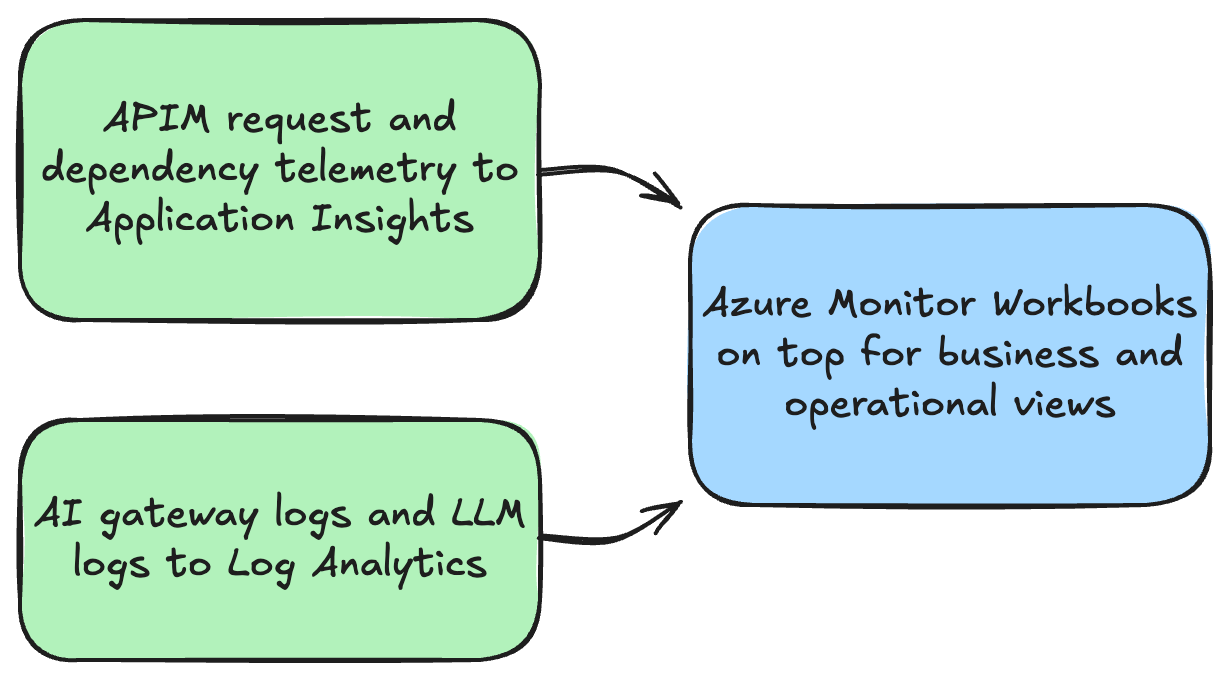
The logging side is covered in the LLM logging docs, and the dedicated log table reference is ApiManagementGatewayLlmLog.
A KQL example for a dashboard could look like this:
AppMetrics
| where TimeGenerated > ago(24h)
| where AppRoleName has "apim-shared-ai"
| where Name == "Total Tokens"
| extend dims = todynamic(Properties)
| extend user_hash = tostring(dims["user_hash"])
| where isnotempty(user_hash)
| summarize total_tokens = sum(todouble(Sum)) by user_hash
| top 20 by total_tokens desc
Semantic Caching
I have not yet found a compelling use case for APIM semantic caching in my workloads, so I have not enabled it. The main draw of the feature is that it can automatically cache semantically similar requests and responses.
Most of my LLM workload is either coding-oriented or tied to RAG-style scenarios. In both cases, two prompts that look quite similar can still reasonably require very different outputs. Because of that, I have not yet felt confident that semantic caching would lead to more benefits than actual harm in my specific scenario.
There is also the operational side. If I want APIM semantic caching, I need an external Redis-compatible cache with the right capabilities. The semantic caching docs call out Azure Managed Redis and RediSearch requirements. Skipping this let's me avoid an extra moving parts.
So for now I am mostly depending on the provider or model-side caching behavior where it exists, and leaving APIM semantic caching out of the picture. That might change later. Right now it just does not feel like the correct optimization target for my workloads.
The weird 100k free requests bootstrap story
One small thing that felt oddly fuzzy to me was the messaging around the free requests benefit when creating AI Gateway through Foundry. The pricing page just has a single * row you need to search for.
The docs point out that AI Gateway includes a free tier and refer to pricing details from the Foundry AI Gateway setup page. At the time I was doing this, the portal and docs wording around the first 100k requests sounded nice, but I never found a verification path to see that I'm actually getting them (and what determines it).
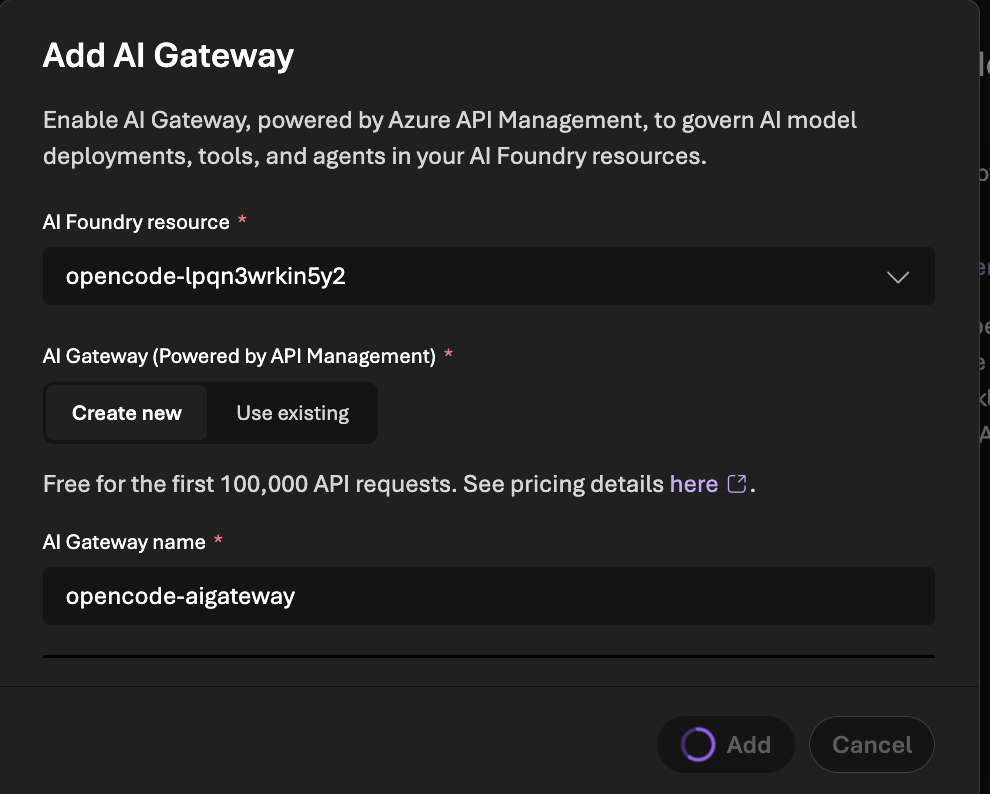
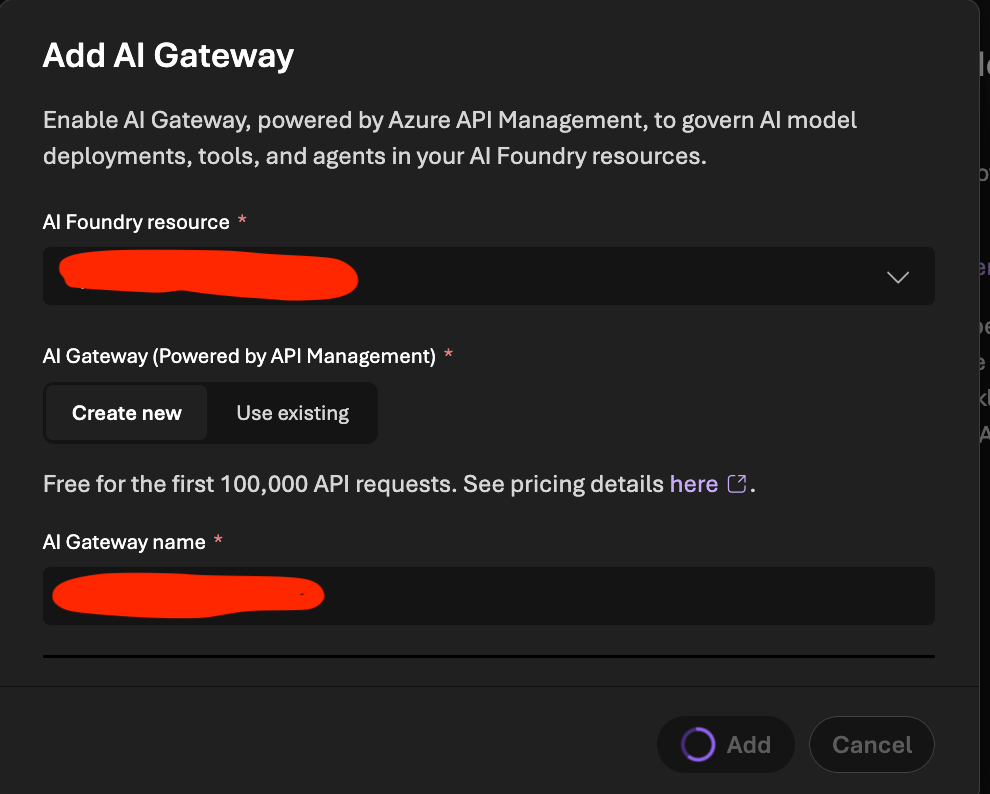
That led me to a slightly dumb workaround. I ended up doing a three-phase deployment:
- deploy the rest of the platform without APIM management
- create the AI Gateway / APIM association from the Foundry portal first
- then let my Bicep adopt and configure the APIM side afterward
Does that sound a bit silly? Yes. Thankfully we only need to do this once, so I can live with it.
Links / references
- AI gateway in Azure API Management
- Configure AI Gateway in your Foundry resources
- Import a Microsoft Foundry API
- Authenticate and authorize access to LLM APIs by using Azure API Management
- Backends in API Management
- Limit large language model API token usage
- Emit metrics for consumption of large language model tokens
- Log token usage, prompts, and completions for LLM APIs
- Enable semantic caching for LLM APIs in Azure API Management
- Enforce token limits for models