Many of the LLM harness creators have been experimenting with "spec driven development" flows lately. Some examples for this are GitHub's Spec-kit, Fission-AI's OpenSpec, and Humanlayer's Research Plan Implement flow.
I've been testing all of these and while they all work well, I've found that the RPI flow works best for my workflows. It's simple enough, is easy to implement in any tool and easy to scale depending on the complexity of the task you're working on. Included in this post are examples for implementing this flow in both OpenCode and GitHub Copilot.I
The core idea with all of these is to protect the context of the models, and avoiding going over 40-60% of the total context window to stay in the "smart zone" for all the work you're doing. In practice this is done via saving the state in a markdown file in between the steps.
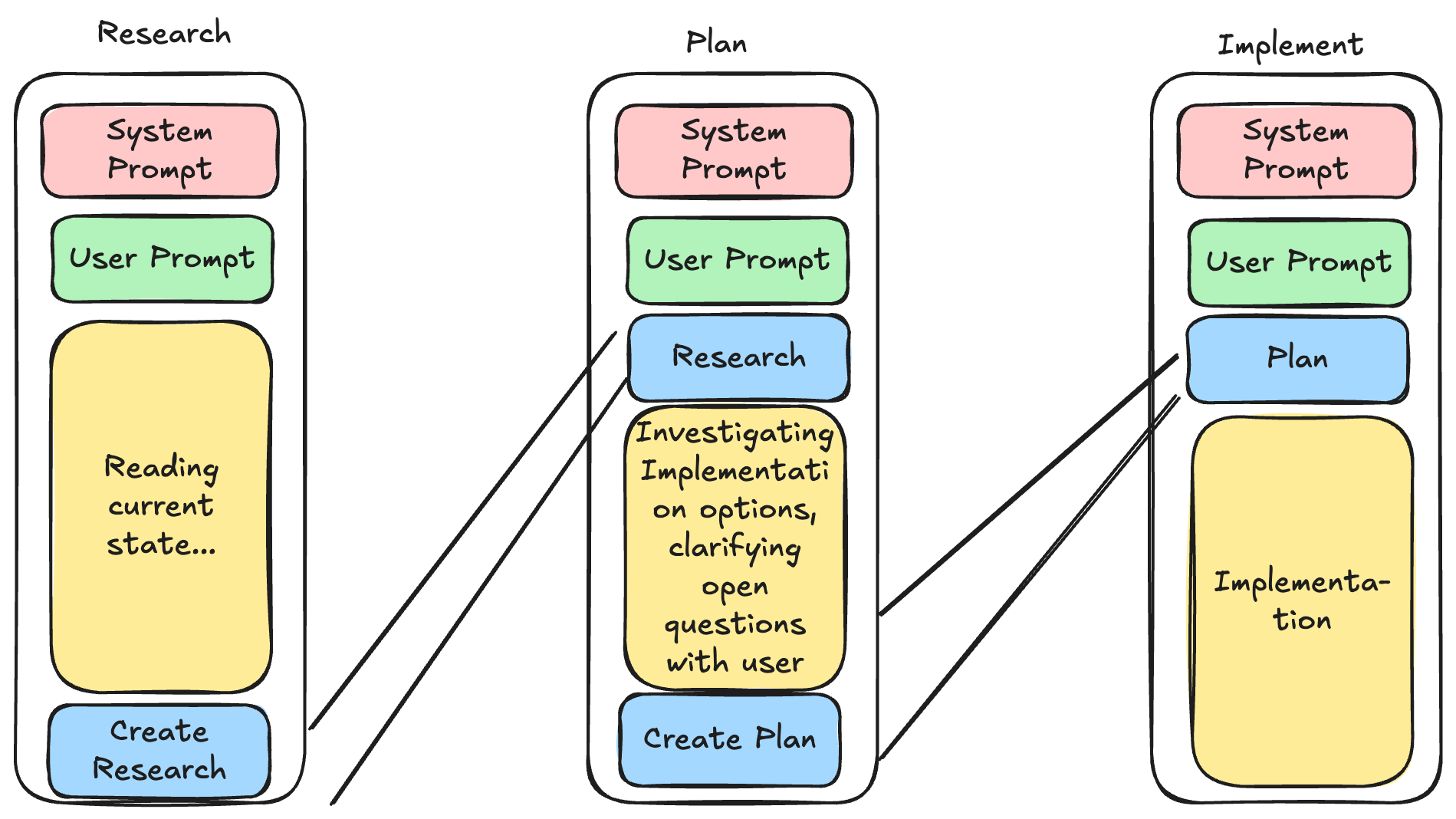
This flow scales both up and down.
- For small tasks, I often skip the full ceremony and just talk directly with the coding agent.
- For medium tasks, one research file + one plan is usually enough.
- For large or messy work, I split the effort into multiple research docs and multiple plans (by domain, service, or milestone) so context stays focused and decisions stay traceable.
The key is not to be dogmatic: do the least structure needed to reliably reach the result you want. Start lightweight, add process only when complexity or risk justifies it, and keep adjusting based on what actually works for your way of building.
My Agent Stack
The main agents I use are just named research, plan and implement. The implementer can be just any normal coding agent. The point of this flow is to get the plan ready so the implementation can start.
This works for every harness that supports custom agents (most of them do). My implementation is mainly for OpenCode, but you can ask your LLM to translate these into any tool of your choice very easily. I basically just took the prompts from the HumanLayer repos, and modified them to meet my needs.
The three agents
I keep this intentionally simple: one agent for research, one for planning, and one for implementation.
Research Agent (Copilot example)
The research agent’s only job is to understand and document the current state of the codebase. Not “fix,” not “improve,” not “rewrite” - just map what exists.
It looks for relevant files, traces how things currently work, and writes the findings into a research markdown file. That becomes a stable handoff artifact for the next stage.
In my mind the main point here is to distill hundreds, thousands, maybe a hundred thousand lines of code into a very compact form describing where the next phase should actually read the most important info from.
Plan Agent (Copilot Example)
The plan agent turns research into a concrete implementation plan with phases and checkpoints.
Its role is to reduce ambiguity before coding starts:
- what files are expected to change
- what is explicitly out of scope
- what “done” means for each phase
- what should be verified before continuing
The output is a plan file that the implementation phase can execute directly.
At this point, implementation should feel like execution, not exploration.
The agent is guided to ask any open questions from the user. Sometimes this does need some extra nudging to make it happen, but it's important that you actually read the plan and discuss with the agent to clarify the actual implementation and also understand yourself what the feature actually needs to do. It's much cheaper to get the details right at this point than tuning after the implementation.
Implement Agent (Copilot Example)
The implement agent executes the approved plan phase by phase.
It is optimized for disciplined delivery:
- follow the plan
- make targeted changes
- run checks
- surface mismatches between “plan vs reality” quickly
If reality differs from the plan, the goal is to adapt while preserving intent, not freestyle a new design in the middle of coding.
In other words, this agent is for shipping, not for deciding architecture on the fly. However, like I mentioned earlier you could replace this part with whatever you want.
About the Slash Commands
You don’t actually need slash commands for this flow.
I use them because they are convenient routing shortcuts:
- /research ... -> sends the prompt to the research agent
- /plan ... -> sends the prompt to the plan agent
- /implement ... -> sends the prompt to the implement agent
That’s mostly it. They’re ergonomic wrappers around prompt dispatch, not a magical requirement.
If your tool can target agents directly, you can run the same workflow without slash commands at all. The repo has some other examples for handoff, iteration and oneshotting implementations, but I've not really experimented with the usefulness of those, as opencode tends to do the compaction step itself, which quite closely matches the handoff logic.
Quick Note About the Repo
I’m linking the repo mainly as a reference for people who want to peek at how this is wired.
It is not really packaged for public consumption or polished as a “drop-in product.”
Still, if you’re curious, you can browse it, copy ideas, and adapt the structure to your own harness/tooling setup. The concepts are portable even if the exact implementation is opinionated.