Lately I've been talking to my coding agents more than typing to them. I started doing it because it's a lot faster, but I've also noticed that I give the agent a lot more context when I talk. When I type a prompt, I tend to write the bare minimum and leave out the background and the reasons behind what I'm asking. When I talk, that stuff just comes out, and the agents are pretty good at picking the actual requirements out of a slightly rambling explanation.
For this I wanted a dictation tool that works with my own models in Microsoft Foundry, and works in both Finnish and English. The main reason for building something of my own is that I don't want my speech or transcripts going to a service I don't control. Dictation picks up whatever I happen to be working on, and governance matters here. This way the audio and the text only go to my own Azure resources, behind my own access control, and I don't have to pay another service for the model usage either.
I ended up with OpenWhispr, a small shim in front of Foundry, a few patches and an Android app. All of my parts are in my openwhispr-foundry repository.
Why not just use a local model?
I switch between Finnish and English depending on what I'm doing and who I'm writing to, and I don't want to change any settings when I do. Local models work well for English, but Finnish was more of a problem. I had already compared a few options for another project of mine, using 41 short Finnish voice recordings, and the local Parakeet model got every third word wrong:
| Model | Word error rate |
|---|---|
| MAI-Transcribe-2Foundry | 6.1 %13 / 213 words |
| GPT-Live-TranscribeFoundry | 8.5 %18 / 213 words |
| Parakeet TDT 0.6B v3on device | 33.3 %71 / 213 words |
MAI-Transcribe-2 got 13 words wrong out of 213, Parakeet 71. Some of the cloud model's errors were harmless things like number formatting, while Parakeet dropped words and changed verbs, which is the kind of stuff that changes the meaning. Android's own on-device recognizer didn't support Finnish at all on the emulators I tested. A cleanup model can fix punctuation and casing afterwards, but if a word is missing from the transcript, there's not much it can do about it.
So I ended up using Foundry models for both the transcription and the cleanup.
What is OpenWhispr?
OpenWhispr is an open source, MIT licensed dictation app for macOS, Windows and Linux. You press a hotkey and talk, and the text gets typed wherever your cursor is. It can also run the transcript through a language model to clean it up (remove the "umm"s, fix punctuation and handle self-corrections like "on Tuesday, no wait, Wednesday"). On top of that it does meeting transcription and notes, and keeps a dictionary of words it should know.
The main reason I went with it is that it supports self-hosted servers for both the speech-to-text and the language model. It even has an example for plugging in your own speech backend, which I'll get to below.
The speech models: LLM Speech and MAI-Transcribe-2
I've been using two speech models in Foundry, and I switch between them from the model field in OpenWhispr.
LLM Speech is a speech-to-text model in Azure Speech that is enhanced with a large language model. You call it through the fast transcription API with "enhanced mode" turned on. It detects the language by itself if you don't give it a locale, and the 2607 update in September improved exactly the thing I care about, which is audio where the language changes mid-conversation. It also takes a phrase list and a prompt. The prompt sounds like it could do the cleanup step too, but in my testing it only changed the output format. Rules like "keep only the corrected version" were ignored, so the cleanup still happens separately. Note that it's still in preview and only available in some regions. I run it in North Europe.
A few things I ran into with it:
- Leave the language on auto. When I forced Finnish, it returned lowercase text with no punctuation.
- It's picky about the audio format. With MP3 it heard "Azure Foundryyn" as "Asher Phone:ään" on every run, while WAV was fine.
- Every now and then it takes the upload and just never answers. The shim times those out and sends the audio to MAI-Transcribe-2 instead, which runs in another region.
MAI-Transcribe-2 is Microsoft's own transcription model (MAI as in Microsoft AI), also in preview and called through the same API. It's fast. A 14 second clip takes about 0.4 seconds through my shim, and it was the most accurate one in the Finnish comparison above. It also has a "clean" style that already drops filler words in the transcript. MAI-Transcribe-2 is the default model in my shim.
Both take OpenWhispr's dictionary as a phrase list, so names and product terms go along with every request.
The shim
OpenWhispr expects OpenAI style APIs, and Foundry's speech API is a bit different, so there's a small Python server running on localhost between them.
OpenWhispr has a custom-asr-shim example for exactly this. It's a single Python file that takes OpenWhispr's speech-to-text request, converts the audio with ffmpeg and passes it to a transcribe() function you write for your own backend. Its README also documents what OpenWhispr sends and what it expects back. I started from that, and my shim still uses only the standard library. A LaunchAgent starts it at login.
It handles three kinds of requests:

- Dictation goes to LLM Speech or MAI-Transcribe-2, depending on the model field. The shim converts the audio to what each model wants (WAV for LLM Speech, MP3 for MAI-Transcribe-2) and sends the OpenWhispr dictionary along as a phrase list.
- Cleanup requests are forwarded to my Foundry deployments, with a few parameter fixes Azure insists on. For example the newer models want
max_completion_tokensinstead ofmax_tokens, and OpenWhispr's "Disable thinking output" toggle has to becomereasoning_effort. If Azure still rejects a parameter, the shim drops it and tries again. - Meetings come in over a WebSocket in the OpenAI realtime format, which needs the patched app (more on that below). The shim cuts the audio at pauses and sends each segment to MAI-Transcribe-2. My microphone and everyone else's audio are separate streams, and the other side is cut sooner so a single segment doesn't cover two speakers.
All of them use the same Entra ID token from az account get-access-token, which the shim caches until it's about to expire. My account has a data-plane role on the resources, and there are no keys stored anywhere. The shim also keeps its connections to Azure open between requests, which saves around 170 ms of TLS handshake on each request after the first.
The cleanup model
When I first tried this in early 2026, I used the larger GPT-5 for the cleanup, and it was just way too slow. When you're dictating you're sitting there waiting for the text to appear, and even a few seconds of waiting gets annoying pretty quickly. That's a big part of why I didn't end up dictating much back then. Now gpt-5.4-mini with thinking turned off takes about a second for a normal dictation, and maybe two seconds at most for a really long one. It has also been the most faithful to what I actually said in my testing. The nano model was a little quicker, but every now and then it trimmed my wording ("Can you send me" became "Send me"), which is not what I want from a cleanup step.
There was also one Finnish specific thing I had to fix. OpenWhispr's default cleanup prompt says to fix grammar, and the model took that as permission to turn colloquial spoken Finnish into standard written Finnish. "Ei oo" became "ei ole" and "mut katotaan" became "mutta katsotaan". If I say something colloquially, I want it written that way, so I changed the prompt to fix only punctuation and capitalization and to keep every word in the form I said it.
Patching OpenWhispr
Plain dictation and cleanup work with the official OpenWhispr build. There were a few things I wanted that it can't do though:
- Meeting transcription through the shim. The meeting recording has the OpenAI realtime URL hardcoded. A one-line patch makes it read the URL from an environment variable instead.
- Screenshots in meeting notes. I can paste a slide into a note, and it goes to the model along with the transcript when I generate the notes.
- Dictation from my phone. An HTTP endpoint that takes audio from the phone, runs it through the same pipeline as a hotkey dictation and returns the text.
I didn't want to fork the whole OpenWhispr repository and keep a fork in sync with upstream. Instead I used the same approach as the Helium browser, which keeps its changes to Chromium as a set of patch files and applies them on top of each upstream release. The patching itself is pretty simple. The patches are plain patch files in my repository. A build script checks out the newest OpenWhispr release tag into a separate worktree, applies the patches, runs a smoke test against the shim, and then builds and signs the app. If upstream has changed something a patch touches, the build stops and tells me which patch needs updating.
The result is a separate app called "OpenWhispr Patched", with its own bundle ID and no update feed, so the official updater never replaces it. It's signed with a local code-signing certificate, because macOS ties the microphone and accessibility permissions to the app's signature. Without a stable certificate I'd be granting those again after every rebuild.
The patches are written for my setup rather than as upstream contributions, and some of them, like the phone endpoint, wouldn't make much sense upstream as they are.
Dictating from the phone
I had two requirements for the phone side. I didn't want a separate keyboard app, because I wanted to keep using Gboard. And the mic should only show up when I'm actually typing into a text field. On Android that means an accessibility service. It can tell when a text field is focused and the keyboard is open, show a small button in an overlay window that doesn't take focus away from the keyboard, and put the text into the field.
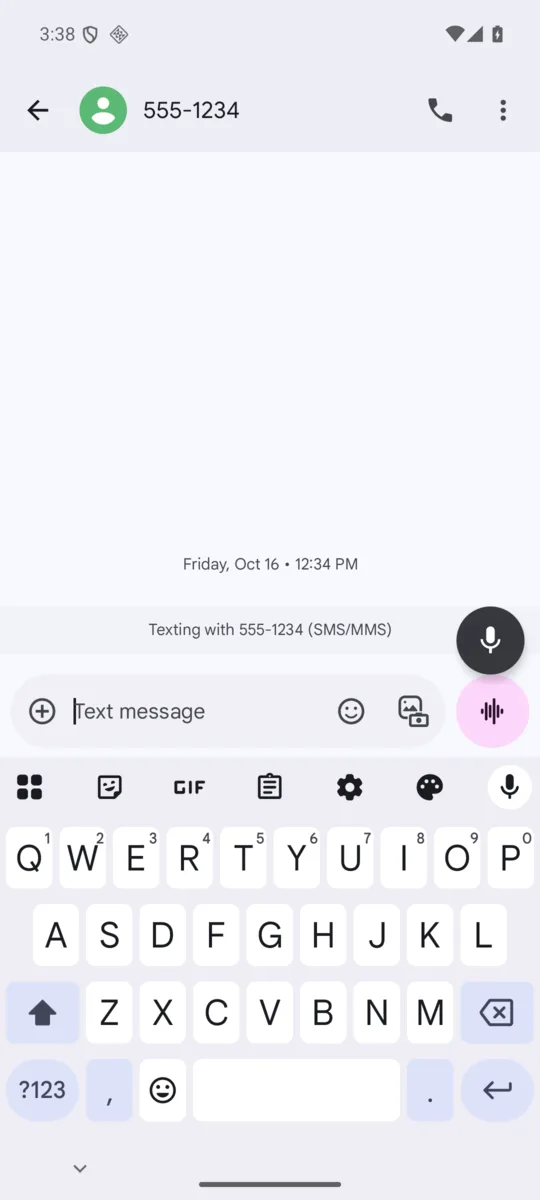
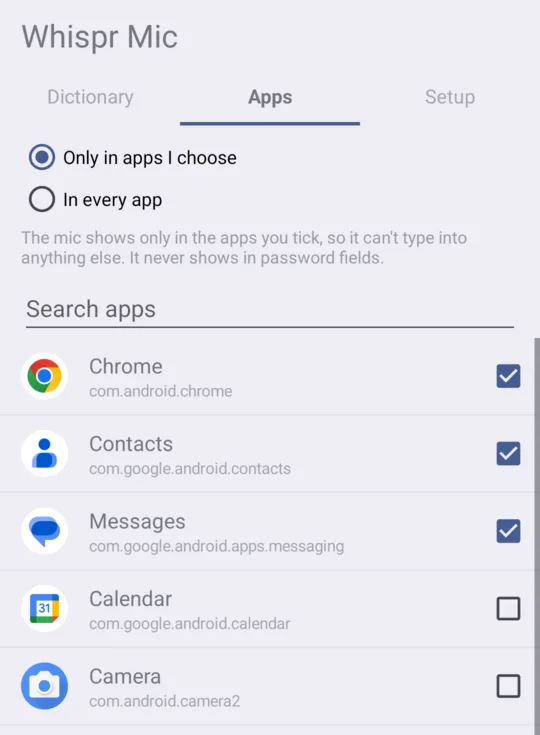
So the app, Whispr Mic, adds a floating mic button just above the keyboard. I tap the mic, talk, tap it again and the text gets typed into whatever field I was in. The button never shows in password fields, and it only shows in the apps I've ticked in its settings. I've only allowed the handful of apps where I actually dictate, since this is built for my own use.
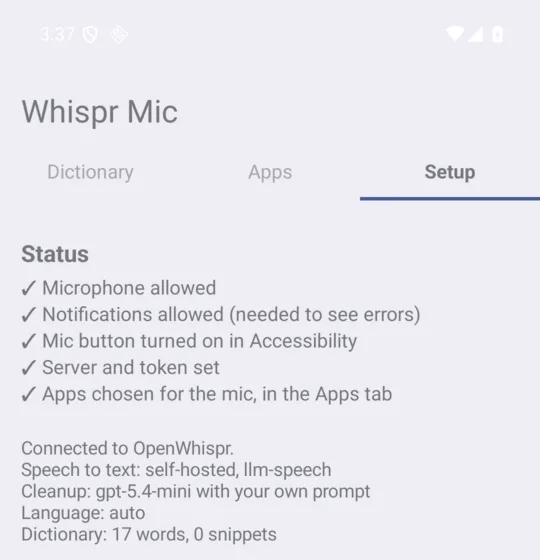
The phone doesn't do any of the speech work itself. It sends the recording to OpenWhispr Patched on my home server, which runs it through the same models, cleanup prompt and dictionary as a dictation on the Mac, so all the settings stay in one place. The app also notices when I correct a misheard word right after a dictation, and adds that word to the OpenWhispr dictionary. That way both the phone and the Mac learn it.
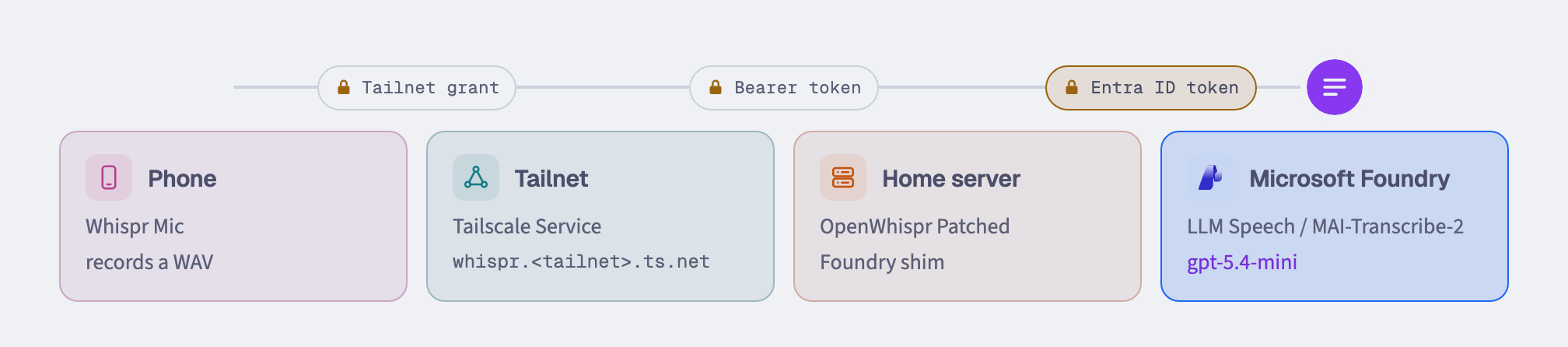
Here's the route a dictation takes, and what gets checked on the way.
- Record. Tap the mic above the keyboard and talk. The phone records the audio.
- Into the tailnet. The recording goes to a Tailscale Service address. Only my own devices that have a grant to that service get through.
- Home server. Tailscale Serve passes it to OpenWhispr Patched, which listens on localhost and checks the token.
- Transcribe. OpenWhispr runs its normal dictation pipeline. The shim sends the audio to Foundry with my Entra ID token from az login.
- Clean up. The raw transcript goes back out to gpt-5.4-mini with my cleanup prompt and dictionary.
- Typed in. The cleaned text comes back the same way and is typed at the cursor.
The checks in a bit more detail:
- Tailscale. The endpoint isn't on the public internet at all. It's published as a Tailscale Service, and only devices in my tailnet that have a grant to that service can reach it. The traffic goes over WireGuard, and Tailscale takes care of the HTTPS certificate.
- A bearer token. OpenWhispr Patched only listens on 127.0.0.1, and every request needs a random 64 character token that I typed into the phone app once.
- Entra ID towards Azure. The shim calls Foundry with my own Entra ID token. The phone never sees any Azure credentials.
The obvious downside is that the home server has to be awake with the app running. In my testing, a 5 second clip from the phone came back cleaned up in 3.3 seconds, with LLM Speech taking 1.7 seconds and the cleanup 1.5.
Getting it on the phone through Google Play
Sideloading an APK would mostly be enough for an app only I use, but some banking apps refuse to open while an accessibility service is installed that didn't come from Google Play.
So the app goes through a Google Play internal testing track. A release script builds a signed app bundle, I upload it in the Play Console, and the phone installs it from Play like any other app. This also meant writing a privacy policy and a disclosure in the app that explains what it reads (the focused text field, only in apps I've picked and never in password fields) and where things go (only to the server I've configured).
Wrapping up
I've been using this daily for about a month now, mostly for talking to coding agents, in both Finnish and English. I think every developer should at least try a voice app for their dev work. OpenWhispr seems to do everything I need it to, without a lot of extra features I'd never use.
The Play listing won't be public, as the app is built for my setup and I'm not planning on maintaining it for anyone else. OpenWhispr is MIT licensed, so you can patch and build it yourself as long as the license notice stays in. The shim, the patches and the phone app are in my openwhispr-foundry repository, also MIT licensed, if you want to take a look at how I did it.
Links
- OpenWhispr
- Azure LLM Speech
- LLM Speech 2607 announcement
- MAI-Transcribe-2 in the Foundry catalog
- Helium, the browser whose patching approach I borrowed
- openwhispr-foundry
Comments